
Wear OS flight instrument
Hear the air.
AIR³ Vario Watch app turns your smartwatch into a flight instrument for paragliding and other free flight activities. It starts as an instant acoustic variometer: it reacts the moment you enter lift, and it finds the weak thermals other varios talk you out of. It draws the thermal you are in, it takes you round a competition task, and it needs no extra instrument and no phone in the air — just your wrist.
Climbing is only half of it. It shows you where the lift is as you turn, works out the wind on its own, points the way to your next turnpoint, and records the flight. A full flight instrument on your wrist — one you mostly listen to.
A vario you listen to, not one you look at
In flight your eyes belong outside — on your wing, on other pilots, on the ground. That is why a variometer speaks. The watch reads its barometric pressure sensor many times per second and turns your vertical speed into a tone you can read without ever glancing down.
Climbing, the tone is high and broken into quick beeps — the stronger the climb, the higher the pitch and the faster the rhythm. Sinking, it drops into a long, low growl. Around zero it goes quiet and unhurried. After a few flights you stop hearing beeps and start hearing air.
Two things a barometer alone cannot do
A pressure sensor is honest but slow: it can only report a climb once you have already gained height. AIR³ Vario Watch adds two layers on top of it — one that reacts sooner, one that hears weaker air.
Instant Lift
The kick, not the consequence
Entering a thermal, you feel the surge in your harness before you have gained a single metre. A barometric vario cannot know about it yet — there is no pressure change to measure.
Instant Lift uses the watch’s accelerometer and gyroscope instead. It continuously computes true vertical acceleration, separating the movement of the air from your own turning and wing movement, and sounds the moment lift begins. This means you hear the entry as it happens, rather than half a second later, which is exactly the moment you need to decide whether to turn.
Weak Lift
Find the small thermals
Weak thermals can be incredibly frustrating. You feel the air working, but the lift is too subtle and inconsistent to give you a clear indication of where to stay. A little lift, a moment of zero, a little sink — and before you know it, the thermal is gone. The real challenge is recognising those tiny changes and using them to stay in the lift long enough to climb.
Weak Lift gives that band its own voice, with its own threshold, resolution and averaging. On weak days, or low over a valley floor, it is often the difference between working a small thermal and walking back to the car.
Rather than a continuous tone, it speaks in groups of three. The first two set a reference; the third rises above them if you have gained height, drops below them if you have lost some, and matches them if you are holding. It works from the altitude you actually gained or lost, not from a vertical speed — which is what lets it resolve changes far too small for a normal vario to call a climb.
Weak Lift — three tones, and the third one tells you
Sinking slightly
The third tone drops below the first two. You are going down — not much, but you are going down.
Holding
All three tones match. At least you are not losing height, and there may be something worth catching nearby.
Rising slightly
The third tone lifts above the first two. You are going up — not much, but you are going up.
It works out the wind for you
Knowing the wind aloft changes decisions: which side of the thermal to work, how far downwind you dare go, what your glide home really looks like. AIR³ Vario Watch measures it in flight, with no extra sensor and nothing to set up.
The method is the one the air itself gives you. Your wing flies at a roughly constant speed through the air, so whenever you change direction, your ground speed rises and falls — fastest downwind, slowest into wind. From that pattern the watch computes both the wind speed and the direction it comes from, and keeps refining it every time you turn. Fly straight and it simply holds the last measurement rather than guessing.
It appears next to your track on the vario screen, in the units you chose. Tap it to switch between a compass point, degrees, or both.
It shows you where the lift was
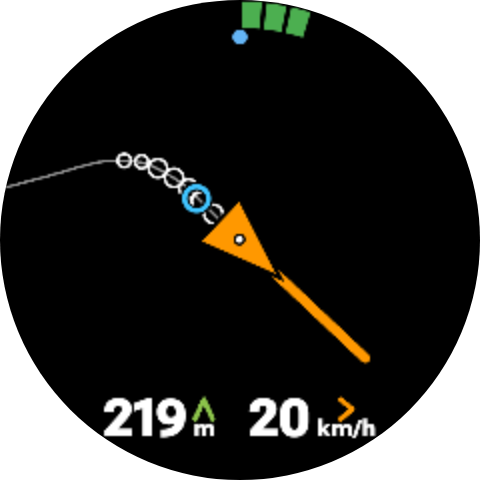
The sound tells you what the air is doing now. Centring a thermal needs the other half of the question: what it was doing where you have already been. Start turning and the watch answers it by itself — it switches to a drawing of your last five minutes, seen from above, with you in the middle and north at the top.
Only the climbing parts are marked, as circles that grow with the strength of the climb. A turn that worked leaves a row of fat circles on one side and bare line on the other, and the correction becomes obvious: shift toward the circles. A small circle marks the core the watch has worked out from those turns — one spot to aim for, rather than a shape to interpret.
And it is drawn in the air, not over the ground: the watch subtracts the drift it has measured as wind, so a thermal going downwind shows as circles stacked on one spot instead of the long spiral your GPS track actually made. That is the difference between a picture you read at a glance and one you have to decode at the worst possible moment.
Fly the task from your wrist
Load the day’s task by scanning the QR code from the briefing, by typing its cloud code, or from an XCTSK file. From then on the watch shows an arrow to the next turnpoint, the distance that is left, and a vibration the moment you cross a line.
The optimised distance
The distance you actually have to fly
A turnpoint is a cylinder, not a point. You only have to clip its edge, so the distance to its centre is the wrong number — on a cylinder of several kilometres it is wrong by several kilometres, and it would send you to the middle of a circle you were meant to cut the corner of.
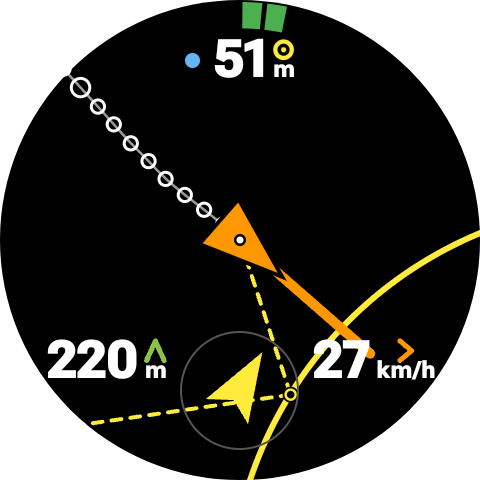
AIR³ Vario Watch solves the whole remaining route instead, every second, from where you are: the shortest path that still touches every cylinder left in the task. The arrow points at the spot on the edge that path goes through, and the figure on screen is the length of that path to goal. Before the gate opens, the start is optimised for the task alone, so you get a fixed point to aim at while you wait rather than a number that wanders as you circle.
Close in, a distance is not enough: a cylinder can be kilometres of flying away while its edge passes a hundred metres from your wingtip. So as the line comes within reach, the watch draws it — the arc of the cylinder in the air around you, the later turnpoints in grey behind it, and a dashed line to the exact point you are aiming at, carrying on toward the one after. Line your track up with it and you arrive where the number said you would.
It shows you where the lift is
Centring a thermal is guesswork made of memory: you felt it stronger somewhere on the last turn, but where exactly? The watch remembers for you. As soon as it sees you circling in lift, the screen switches by itself to a view from above, and draws your last few minutes as circles — the bigger the circle, the stronger the climb at that spot.
Because it knows the wind, it removes the drift: your turns stack on top of each other instead of trailing downwind, so the core stays where it really is. One glance tells you which side to move to. Stop circling and the vario screen comes back on its own.
Navigation, without a map
A watch screen is too small for a map, and in flight you do not want one anyway. You want an arrow and a distance. That is exactly what you get: point the arrow where it tells you, and it takes you there.
Two modes. Back to takeoff needs no setup at all — the watch remembers where you launched and points home. Task follows a competition route: scan the QR code at the briefing, type the cloud code, pick a photo of the QR, or open an XCTSK file. The task lands on your watch, and you can adjust a radius or a start time there too, gloves on. If the phone is already in the car, the watch can fetch a task by its cloud code on its own.
In task mode the arrow does not aim at the middle of the cylinder, which would cost you kilometres. It aims at the point that makes the whole remaining route as short as possible, recomputed as you fly. A second, hollow arrow shows the heading to hold so the wind still drifts you onto it.
A race is more than a string of turnpoints, and the watch knows the difference. It will not validate your start a second before it opens. Every crossing is confirmed by a buzz and by sound — and the sound tells you what you crossed, because the start, an ordinary turnpoint, the end of the speed section and goal each have their own. You can keep your eyes outside and still know exactly where you are in the task.
What it does
Acoustic variometer
Pitch and rhythm follow your vertical speed, with climb and sink thresholds you set yourself.
Starts and stops by itself
The vario arms itself when you launch — detected by ground speed or by altitude change — and stops once you are down.
Everything on your wrist
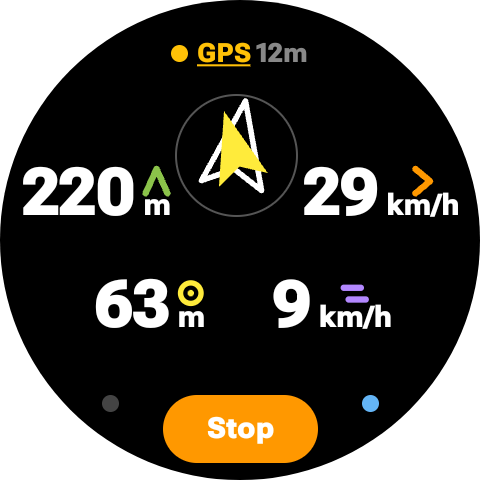
Altitude, ground speed, track, wind and GPS accuracy — visible at a glance, with your climb rate drawn as a ring around the edge of the dial. Still on screen when the display dims.
Adjusted on the wrist, tuned on the phone
What you change at launch — sound, automatic start and stop, Weak Lift, Instant Lift — is one tap away on the watch. Thresholds, altitude reference and units live in the phone app, set once and stored on the watch.
Your flight, recorded
Every flight is written as a signed IGC file with a G-record, and sent to your phone when you land. Ready for your logbook or an online contest.
Sound under your thumb
One tap on the watch cycles full volume, normal volume and silent — useful on a crowded launch, and no digging through menus with gloves on.
A map when it helps, nothing when it does not
The watch draws your thermal while you turn in it, and the turnpoint while you close in on it — each appearing on its own and getting out of the way afterwards.
Competition tasks
Import by QR code, cloud code or XCTSK file. The arrow and the distance follow the optimised route, and each line crossed is confirmed by a vibration — or back to launch, when there is no task.
Leave your phone behind
The watch is the instrument. Sensors, sound, GPS and automatic detection all run on the watch alone — with the screen off, your wrist down, and the phone nowhere near you. There is no Bluetooth link to lose in flight, because there is nothing being sent.
The phone app is where you tune the details, and where your flights land afterwards. Every value you set is stored permanently on the watch, so it survives closing the app, restarting the watch and flying without a phone. The settings you actually touch at launch are on the watch itself, a tap away from the vario screen. Configure the rest once at home, then fly with an empty pocket — or with your phone off entirely, which is one less thing draining a battery you may want at the landing field.
Built for the way you actually fly
Automatic landing detection is deliberately hard to fool. Losing GPS reception makes a watch report zero speed, which looks exactly like standing in a field. AIR³ Vario Watch tracks how confident the GPS is in each reading and refuses to treat an unreliable one as proof you have landed — so a dropout under your wing will not silence the vario mid-flight.
The same goes for the screen. Wear OS only keeps its always-on display alive while it can feel your skin, so a watch worn over a jacket sleeve simply goes dark in flight. You can tell AIR³ Vario Watch to hold the screen on for the whole flight instead, at full brightness or at a level you pick, and get your numbers back whether the watch is on your wrist or over three layers of clothing. The watch also warns you before launch if battery saver is on, because it quietly degrades GPS accuracy.
An altitude that is right from the start
A barometer measures pressure, not height. Turn one on and it will happily show you an altitude that is a hundred metres off, because it has no idea what the pressure is at sea level today. Most instruments leave that to you, and most of us only notice on the way up.
AIR³ Vario Watch sorts it out on its own. While you are unpacking, it compares what the barometer reads with what the GPS says, and sets its reference accordingly — refining it as the fix improves, and settling once the reading is solid. By the time you clip in, the altitude on your wrist is the one on the map, not an arbitrary starting point.
If you know the exact elevation of your launch, a long press on the altitude lets you set it yourself in seconds, on the watch, gloves on. And once you are flying, the reference stays put: nothing is going to shift your altitude mid-thermal.
Free and subscription
Free
- Altitude, ground speed and heading
- GPS status and accuracy
- Sound test and altitude chart
- All settings in the phone app
Annual subscription
- The acoustic variometer
- Automatic takeoff and landing
- Always-on display in flight, on or off the wrist
- Wind speed and direction
- Map mode — the thermal view and the turnpoint view
- Navigation and competition tasks
- IGC tracklog with G-record
- Thermal assistant
- Navigation and competition tasks
Getting started
- Install AIR³ Vario Watch from Google Play — one listing installs both the watch app and the phone app.
- Open the phone app, subscribe, and set your thresholds and units. Everything is sent to the watch as you change it.
- Open the app on the watch before launch and let the GPS settle. From there it starts on its own.
What you need
A Wear OS smartwatch with a barometric pressure sensor — Samsung Galaxy Watch 4 or later is a good reference. A barometer is what makes a variometer responsive; without one the app falls back to GPS altitude, which is far too slow to fly by. An Android phone paired with the watch is needed to configure the app and to subscribe.
Ready to fly with it?
Free to install and free to try. The full manual covers every screen and every setting.
AIR³ Vario Watch app is an aid, not a certified flight instrument. Do not rely on it as your only source of altitude or vertical speed information, and always fly within your training and local regulations.