
For more information, check these related FAQs:
AIR³ 7.3 and AIR³ 7.35 have a 10,000 mAh battery. This gives AIR³ a pretty large battery life. So, how many hours does it mean?
Quick answer: when the device is new, 10 hours for AIR³ 7.3 and 12 hours for AIR³ 7.35. Read on for the details below.
Battery life is not a fixed number of hours
Battery life can be influenced by several factors.
1. How the battery was initialized
As explained in the battery lifespan and maintenance FAQ, battery capacity is optimal when 3 full charge and discharge cycles are performed the first time the battery is used.
2. Display theme
Using a black theme increases battery life by 30%. Not everybody likes it, but it uses much less energy. This is why AIR³ is preconfigured with a hybrid black theme with white maps.
3. Brightness level (the main factor)
Most of the time, when using a smartphone outside, brightness is set to maximum — otherwise information is hardly readable, because the screen brightness is weak on such devices. This is not the case for AIR³. Check the best brightness setting FAQ for more details about the link between brightness, readability, and battery life.
AIR³’s high maximum brightness is there for the moments when you really need it, for example when the sun is at a difficult angle. It is not meant to be used permanently. Maximum brightness means higher power consumption and more heat generated by the device. Over time, this puts additional stress on the battery cells and accelerates their aging, especially when combined with direct sunlight or charging (see point 4 below).
AIR³ 7.35 has a new screen that provides more brightness. To compare the two devices fairly, they should be compared at a similar level of readability. In a test with dynamic brightness disabled (to standardize the comparison) and starting from 100% battery:
- AIR³ 7.3 at 80% brightness is roughly equivalent, in readability, to AIR³ 7.35 at 30% brightness.
- At these equivalent settings, AIR³ 7.3 gets 9 hours of battery life, and AIR³ 7.35 gets 14 hours.
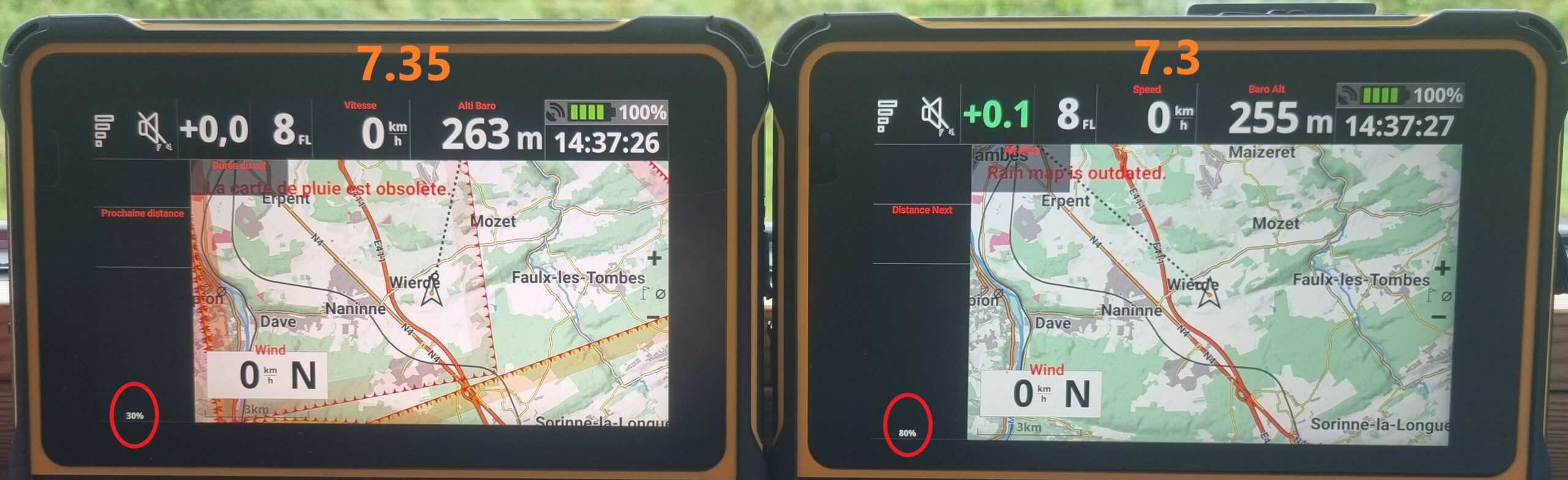
With the AIR³ 7.35 and its very bright screen, if you prefer not to use adaptive brightness, choose your brightness percentage carefully, and avoid 100%. For example, 50% to 60% already gives you all the readability you need. You can still increase it temporarily when the sun is at a difficult angle.
4. How the battery has been used and cared for over time
Battery capacity on a given flight depends on more than just the battery’s age:
- Normal usage. Every charge and discharge cycle gradually reduces the battery’s maximum capacity, even under ideal conditions. This is expected wear, not a defect.
- How the battery was stored between uses. If the device is stored for a while without a sufficient charge level, the battery cells can get damaged, permanently reducing capacity. See the battery lifespan and maintenance FAQ for the correct storage guidelines.
- Heat and other external factors. Excessive heat (device left in direct sunlight, charging while the device is hot, maximum brightness used for long periods) or a power surge can damage the battery cells and electronics and reduce its capacity — independently of normal wear. Heat and charging don’t go well together: avoid connecting a charger or a power bank to an AIR³ that has been heated by the sun.
Noticed a sudden, significant drop in battery percentage during a flight? A drop that clearly cuts into your battery life is most likely a sign that the battery has aged and needs to be replaced, rather than a device malfunction. See the battery lifespan and maintenance FAQ to check the battery’s health and, if needed, order a replacement.
In summary
Using AIR³ the recommended way (correct battery initialization, dynamic brightness, dark theme), you should get 10 hours of battery life with 7.3 and 12 hours with 7.35 when you start using the device.
Without taking these recommendations into account, depending on your settings and the way you manage your flight, you should get:
- Between 7 and 12 hours with AIR³ 7.3
- Between 6 and 15 hours with AIR³ 7.35
In practice, you will probably be happy with our default settings and adaptive brightness — this gives you more than enough power.
Tips for very long flights
If you know you are going to fly for a very long flight, here are 4 tips to keep in mind:
- Start fully charged, as is the case with most smartphones or tablets.
- Let adaptive brightness do its job. AIR³ 7.3 and 7.35 have an advanced adaptive brightness sensor that adjusts brightness to current conditions. This significantly reduces the average brightness level compared to flying at full brightness all the time.
- Adjust brightness manually if needed. Brightness widgets and +/- buttons are easily accessible, so you can adjust energy consumption according to your needs and the duration of your flight.
- Turn off the screen when you don’t need it. A short click on the power button turns off the screen only — tracking, live tracking, and acoustic audio all remain active. With the screen off, battery life can be counted in days. So if you are on a very long flight and have already used an important part of the battery, turning off the screen this way whenever you have the chance will add hours to your battery life. A new short click on the power button turns the screen back on.
Maximum brightness is useful for short moments, for example when the sun is at a difficult angle. We don’t recommend using it permanently: it increases power consumption and heat, and accelerates battery aging.
If you are planning a very long flight and don’t want to be bothered by a potential energy shortage, you can use a power bank together with the Pogopin USB cable once you reach a low remaining battery percentage (keeping the power bank always connected to the device is not ideal). Never connect a power bank to an AIR³ that has been heated by the sun: let it cool down in the shade first. See the battery lifespan and maintenance FAQ for more on heat and charging.
Check our Readability matters page to better understand the influence of tilt on readability.